What is Full Stack Developer?

Welcome back to Programming with NewbieCodes. In this blog we will discuss about What is Full Stack Developer?

In software development (especially web development), we hear the phrase, “full stack developer” as in “I’m a full stack developer” or “we’re looking for a full stack developer” or even in Instagram Bio “full stack developer” but What do you mean by Full Stack Developer ?? , Lets find the answer for it ….

Lets first understand what are various job title

Front-end Developer (AKA Client-Side Developer)

This is a developer who specializes in the programming of visual user Interfaces, including its aesthetics and layouts. A front-end developer code runs on a web browser, on the computer of the user of the site.

Backend Developer (AKA Server-Side Developer)

This is a developer who specializes in the design, implementation, functional core logic, performance and scalability of a piece of software or system running on machines that are remote from the end-user.

Full stack Developer

This is a developer that does both front-end and back-end work. He or she has the skills required to create a fully functional web application.

Middle-Tier Developer

This is a developer who writes non-Ul code that runs in a browser and often talking to non-core code running on a server. The term middle-tier developer is used to describe someone who is not specialized in the front-end or the back-end but can do a bit of both, without being a full stack developer

Web Developer

This is a software engineer who specialize in creating websites. They are either front-end developers, back-end developers, middle-tier developers or full stack developers.

Desktop Developer

This is a developer who works on software applications that run natively on desktop operating systems (such as Mac OS, Windows, and Linux)

Mobile Developer

This is a developer who writes code for applications that rum natively on consumer mobile devices such as smartphones and tablets

Graphics Developer

This is a type of developer specialized in writing software for rendering. lighting, shadowing, shading, culling, and management of scenes. These developers are often responsible for integrating technologies in the gaming and video production industry.

Game Developer

This is a generic term to identify a developer specialized in writing games. Game developers can fall into one of the other categories of developers, but they often have specific knowledge and skills in designing and Implementing engaging and interactive gaming experiences.

Data Scientist

This type of developer writes software programs to analyze data sets. They are often in charge of statistical analysis, machine learning, data visualization, and predictive modeling.

Big Data Developer

This type of developer writes software programs to store and retrieve vast amounts of data in systems such as data warehouses, ETL (Extract Transform Load) systems, relational databases, data lakes management systems, etc.

DevOps Developer

This is a type of developer familiar with technologies required for the development of systems to build deploy, Integrate and administer back-end software and distributed systems.

CRM Developer

This type of developer specializes in the field of systems that collect user and consumer data. These developers are tasked with improving customer satisfaction and sales by improving the tooling used by customer support representatives, account managers, and sales representatives.

Software Development Engineer in Test (SDET)

This type of developer is responsible for writing software to validate the quality of software systems. They create automated tests, tools and systems to make sure that products and processes run as expected.

Embedded Developer

This developer works with hardware that isn’t commonly classified as computers, For example, microcontrollers, real-time systems, electronic interfaces, set-top boxes, consumer devices, IOT devices, hardware drivers, and serial data transmission fall into this category

High-Level Developer

This is a general term for a developer who writes code that is very far from the hardware. in high love scripting languages suns PHP. Perl Python and Ruby

Low-Level Developer

This is a general term for a developer who writes code that is very close to the hardware, in low-level languages such as assembly and C.

WordPress Developers

This type of developer creates and customizes themes and plugins for WordPress and administer WordPress sites

Some Popular Stacks

  • LAMP stack: JavaScript – Linux – Apache – MySQL – PHP
  • LEMP stack: JavaScript – Linux – Nginx – MySQL – PHP
  • MEAN stack: JavaScript – MongoDB – Express – AngularJS – Node.js
  • Django stack: JavaScript – Python – Django – MySQL
  • Ruby on Rails: JavaScript – Ruby – SQLite – Rails
Native vs Hybrid

Welcome back to Programming with NewbieCodes. In this blog we will learn What’s the difference between Hybrid App and Native App.
The Newbie Who Codes

The rapid evolution of technology has offered access to a variety of applications and technologies. Advanced mobile communications and portable computing devices are now combined in handheld devices called “smart mobile phones, IPADs, Tablet PC ”, which are also capable of running third-party software.

Many Newbie Programmers get confused between Native Mobile App Development and Hybrid Mobile App Development. The name Hybrid App is self explanatory , As it consist of Native App and Web solutions. The major and core of hybrid app is written using Web Technologies. In this article we will dive deep into various app development technology.

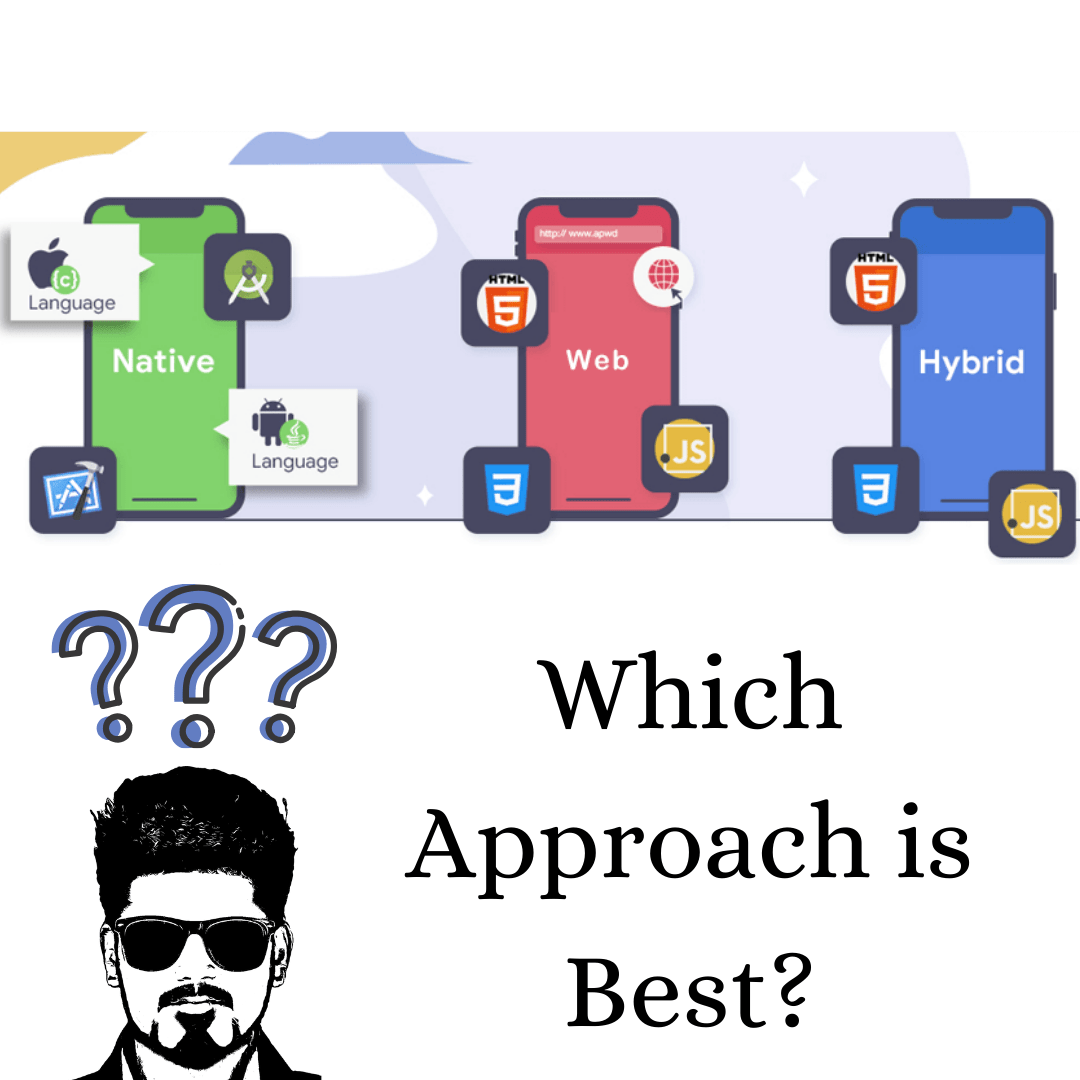
There are three main mobile app development approach you can explore for your mobile app development project: Native App Development, Web App Development and Hybrid App Development. 

What is Native App Development?

Native App Development are intended to perform certain tasks on a specific platform or environment. Native mobile apps are the most common type of app. They are built for specific platforms and are written in languages that the platform accepts for example, Objective-C and Swift are two common languages for iOS native apps and Kotlin and Java are common languages for Android Native apps.

The Newbie Who Codes

Native apps are also built using the specific Integrated Development Environment (IDE) for the selected operating systems. Native apps perform in a fast manner, has a responsive interface, are distributed in app stores, provide intuitive user output and input, do not always need an active internet connection.

Here are some Pros and Cons of Native App Development

Pros

  • Flawless Performance on Specific Platform
  • Superb Speed
  • Impressive User Experience
  • User Data Protection
  • Flexibility

Cons

  • Time-Consuming Development
  • Expensive
  • Risk 

What is Web App Development?

The most common question is How are web apps different from websites? A website typically offers more information than a web app can display, therefore web apps condense website content to improve functionality. A web app loads in browsers like Chrome, Safari, or Firefox, and doesn’t need to be downloaded from App stores like native mobile apps.

The Newbie Who Codes

How can we Build a Web App?

The very common technologies we use for web apps are JavaScript, CSS, and HTML5 and run inside a web browser. There is no need to use Specific SDK (software development kit) for developers; however, there are templates for them to work with. If you choose to develop a web app, it can be straightforward and quick to build. Web apps also don’t take up storage on the user’s device. Although, web apps are often oversimplified and don’t offer the same features a native app can deliver.

Pros

  • Easy to maintain .
  • Common code base across multiple mobile platforms.
  • Supports all platforms as long as they can run in an appropriate web browser.
  • less expensive upfront .
  • Can be released at any time and in any format.
  • The newest version always loads when a user opens a web app.

Cons

  • Smaller scope
  • A browser is required to run a web app.
  • Poor discoverability because web apps are not listed in the app store.
  • Slow and Less Responsive than Native apps.
  • Less interactive and intuitive compared to native apps.

Is there any other App Development method available?

With native app development, you have to build different apps for different operating systems i.e. we need to write different source code for different platforms; however, developers have new technology for programming. The solution for this is Hybrid App Development technology.

The major advantage is Hybrid Apps work across multiple platforms and behave like native apps. A Hybrid App Development is essentially a combination of a Native App Development and a Web App Development. Although this type of apps can be installed on a device like a native apps, it technically is a web apps.  These types of apps are built with HTML, CSS, or JavaScript and run in a webview(Browser).

What is Hybrid App Development?

The name Hybrid App is self explanatory , As it consist of Native App and Web solutions. Considered as a combination of native app and web app, a hybrid app is built as a single app that works across various operating systems like Windows, Android, and iOS. Hybrid app development is essentially a web app that incorporates additional native features. Including native features is possible when you deploy a wrapper to act as a bridge between platforms. A hybrid app consists of two parts:

  1. The backend code of Hybrid app is written in languages like HTML, CSS, or JavaScript.
  2. A native shell. This shell is downloadable and loads the code using a webview.

Let’s get a clear idea about its major advantages and disadvantages.

Pros

  • Cost-effective Development
  • Low Maintenance Needed
  • Less Time Needed for Development
  • No need of web browser
  • Only one codebase is needed

Cons

  • Flawed Performance (3D Games)
  • Dont support seamless user experience across all the platforms
  • Dependency on native plugins, various frameworks.

Which Approach is Best?

Many Newbie Programmers get confused between Native Mobile App Development and Hybrid Mobile App Development. One can select to build either a web, native or hybrid app based on your business objectives. All of them have their own positive sides and pitfalls as well. Before jumping into development, you should consider the business requirements, consult a proficient app developer who can turn your ideas into reality with utter efficiency.

The Newbie Who Codes

Native app and Hybrid app development have their own advantages and disadvantages as discussed earlier. The most important difference that you can find between hybrid app development and native app development is a hybrid app requires less amount of time and money to be developed as compared to a native app.

Developing a hybrid app means maintaining a single code. On the other hand,the native apps are focused on specific device platforms and hence native apps offer smooth user experience because they are particularly developed and designed for a single app store with which your users can get the best compatible apps.

The debate surrounding which app type is best is still very relevant today as the lines between the three approaches are becoming increasingly blurred. While the discussion to differentiate the three mobile apps continues, it’s important to remember that you shouldn’t choose an approach for the technology, but instead, choose based on what you want your app to do. If you choose an approach that doesn’t allow your app to utilize device features, then you’ll end up wasting a lot of time and money when you decide to add features.

The choice between web, native, and hybrid development is dependent on a number of factors, including business needs, app requirements, developer skill, and timelines. The bottom line is that each type of app offers an entirely different experience and it’s important to know the strengths and weaknesses of each before jumping into development.

Following point one should consider Before jumping into development:

  • Business Objectives
  • Business Requirements
  • Budget & Investment
  • User Experience

Have you developed a native or hybrid app earlier? Feel free to share your experience in comment section and don’t forget to visit our social media .

IONIC 5 UI/UX

Hello All, Welcome back to My Blog . In this blog we will learn how easy it is to use the IONIC 5 Framework.

What is Ionic ??

Ionic is a powerful HTML5 SDK that helps you build native-feeling mobile apps using web technologies like HTML, CSS, and Javascript. Ionic is focused mainly on the look and feel. UI interaction of your app.The goal of using this Ionic Framework is to build mobile apps easily using Web Technologies.

How to install Ionic 5 Framework??

Firstly we will Install the Ionic CLI using npm:

$ npm install -g @ionic/cli

Note :Make sure you have NODE.JS pre-installed on your system

With above command we can install Ionic CLI .

For all the newbie coders and new linux users I would like to inform you all that we use ‘ -g ‘ to install the particular package globally

How to Initiate Ionic Framework?

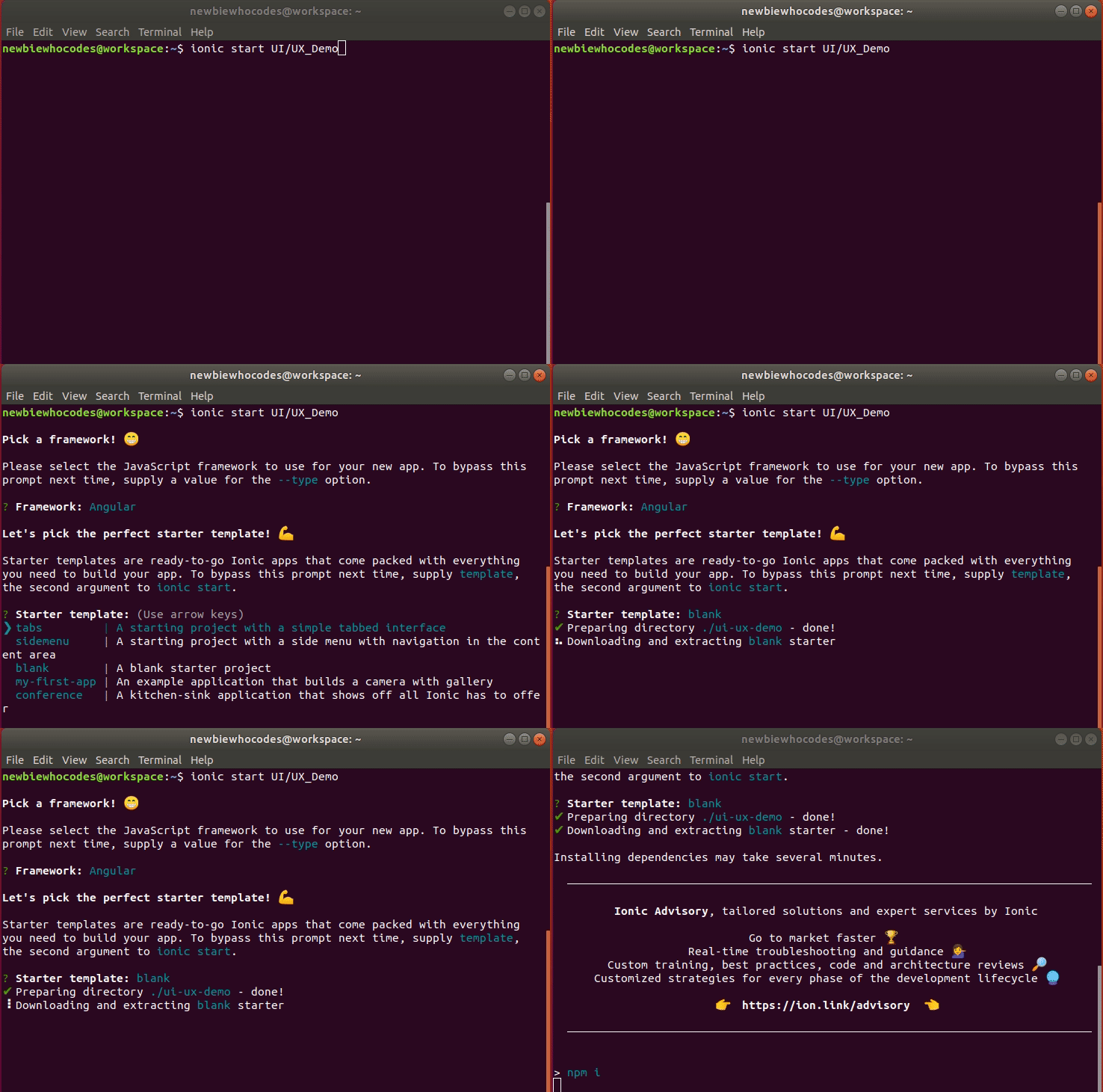
Now as Ionic installed successfully we can start Working on app.We can make app with some pre-defined templates like blank , tabs , and sidemenu.As name suggest blank  starter provides blank  UI, blank , tabs  starter provides tabs at the bottom, and sidemenu provides us previously done sidemenu.Let’s see the Commands for each one by one.

$ ionic start UI/UX_Demo     //it start the blank app by default.
$ ionic start UI/UX_Demo blank    //to start the blank app.
$ ionic start UI/UX_Demo tabs         //to start the app containing Tabs.
$ ionic start UI/UX_Demo sidemenu       //to start the app having sidemenu predefined

To See all available templates we can use the following command:

$ ionic start --list

Here we get all three Template mentioned above and in addition to that we have two more Templates i.e.

$ ionic start UI/UX_Demo  my-first-app  // An example application that builds a camera with gallery

This Template is used to demonstrate an example application that builds a camera with gallery

$ ionic start UI/UX_Demo  conference  // A kitchen-sink application that shows off all Ionic has to offer

And This one is used to demonstrate A kitchen-sink application that shows off all Ionic has to offer

How to check if its Working ??

You can check if ionic is installed properly or not .All you need to do is Run the following Command in working directory.

$ ionic serve 

Note: Make sure you are in Working Directory ; If not then you can go to that directory using ” $ cd directory name ” .

For example :

$ cd UI/UX_Demo

To get started with Basic UI/UX design Visit next page .

Welcome to NewbieCodes !

Hello All, Welcome to My Very First Blog.firstly Let Me Introduce Myself , I Am a Newbie Who Just Started Coding . In This Blog You Will Find All the Technical Project I Am Currently Working on.


Experienced Public Relations and Marketing Specialist With a Demonstrated History of Working in the Computer Software Industry. Skilled in Python (Programming Language), Ionic 4 Framework,c++, Java, Android Development, Java Script and Html. Strong Marketing Professional With a Bachelor of Technology – Btech Focused on Computer Science.

I Personally Consider Hands-on Experience to Be as Useful as Academic Qualifications.

Yes!!! Its All About One’s Perception . According to Survey Young Men and Women Have Different Perception About Computer Science. While the Male Students Tend to Focus on Technological Aspects Like Hardware, Mathematics, or Logical Issues. Where as the Female Students Are Attracted Rather by Creativity, Communication, or Job Opportunities.


There Will Be a Next Blog Post Soon, in the Meantime You Can Visit My Social Media Handlers.

Stay Tuned & Subscribe to Never Miss an Update…

Design a site like this with WordPress.com
Get started